How to check an AI lesson note before you hand it in
Eight checks, with the mistakes we found in two apps' notes.
Francisca Akoto · November 17, 2026 · 4 min read
Search for a GES lesson note generator today and you get a long list. On 17 November we found eleven tools offering Ghanaian teachers AI lesson notes or lesson plans, several of them promising a finished note in a minute or less.
With AI writing the code, a developer can now quickly build an app that prints something shaped like a lesson note. Making the note right takes longer: someone has to load the curriculum correctly, match it to this year's calendar, and read the output the way a headteacher will. The two apps we could check had mistakes that a careful read catches.
Your name and signature go on the note, whichever app wrote it. So we took the sample lesson note and scheme of work that another app shows on its own homepage, both for Basic 7 Mathematics, and checked them line by line against the NaCCA curriculum and the GES calendar. Here is what to look for, with what we found.
1. Check the indicator against the curriculum
Every lesson note and scheme of learning is built on indicator codes, such as B7.1.1.1.1. Open your curriculum and check that each code exists for your class and subject, and that the words next to it are the curriculum's words, in full.
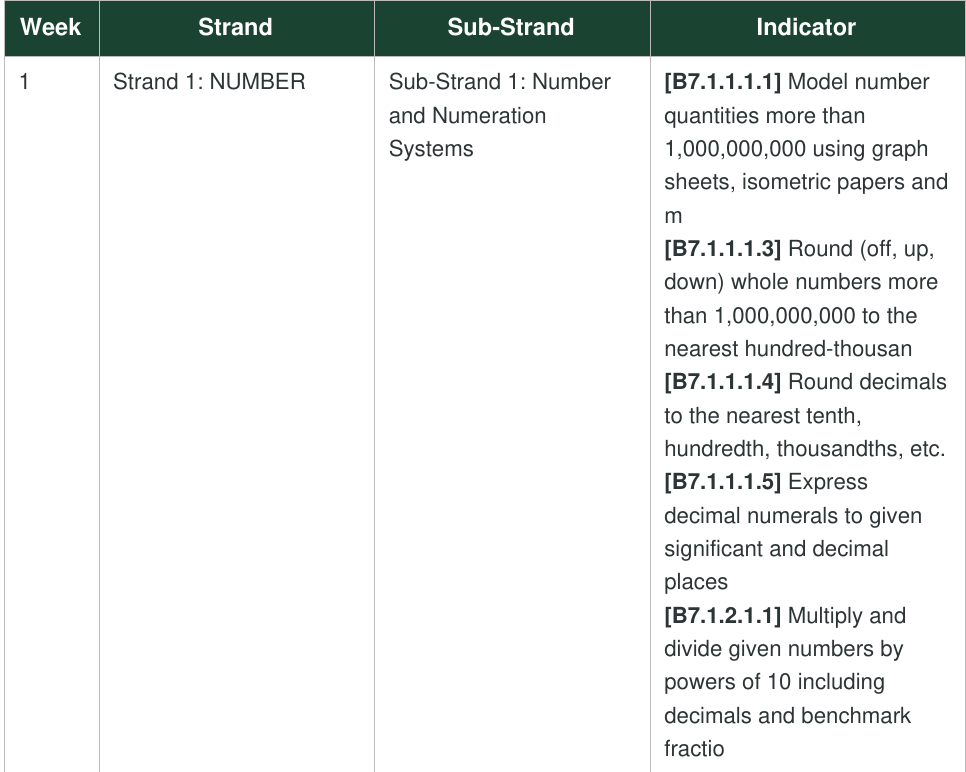
In the sample scheme of learning, indicator text stops mid-word. In Week 1 three indicators end at "m", "hundred-thousan" and "fractio", and in Week 2 one ends at "Factor (H". The same Week 1 row is labelled "Number and Numeration Systems", but B7.1.2.1.1 belongs to Number Operations.
A second app we checked offered indicators from other sub-strands in its indicator list, so a teacher picking from that list could put the wrong code on the note without knowing. (If the codes are new to you, here is how they work.)
2. Check that the whole lesson teaches that indicator
Read the activities and the assessment questions against the indicator, one at a time. Each one should be teaching or testing it.
The sample note is for B7.1.1.1.1, modelling numbers over 1,000,000,000. Its second activity compares and orders numbers and its third rounds to significant figures, and neither belongs to this indicator. Three of its four assessment questions use numbers under a billion.
3. Do the sums yourself
Work through every calculation, date and fact you will teach from.
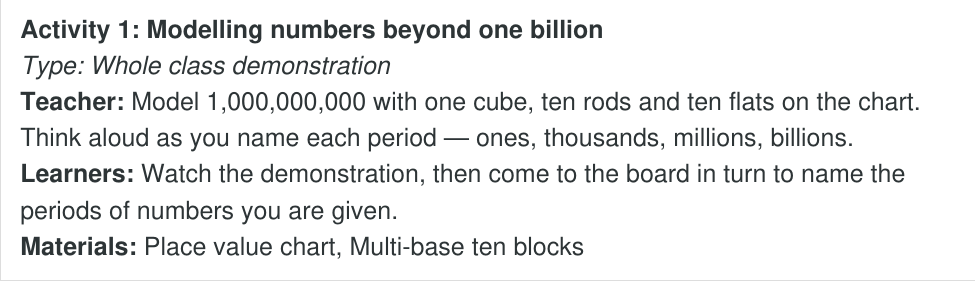
The sample note's main activity tells the teacher to "model 1,000,000,000 with one cube, ten rods and ten flats". With the block values the curriculum itself gives for this indicator (a cube is 100,000, a rod 1,000,000 and a flat 10,000,000), that adds up to 110,100,000. A teacher who follows the note shows the class the wrong number.
4. Check the date and the week number
The date, the day and the week of term should agree with each other and with the GES calendar.
The sample note is headed "Tuesday, 4 November 2026" and "Week 3". That date is a Wednesday, and it falls in the ninth week of first term.
5. Look for details you never gave it
If you left a field blank, it should stay blank or ask you. Check the class size, the school, the period length and anything else about your class.
The second app printed "Class Size: 30" on a note where the teacher had left class size empty.
6. Count the phases
A GES lesson note moves through three phases: Starter, Main and Reflection. We explain each one in how to pass vetting the first time.
The sample note has five, with group work, assessment and closure each made into a phase of its own. A headteacher who checks the phases may ask you why.
7. Check the scheme of learning against the term
A scheme of learning (or scheme of work) should spread the year's indicators across all three terms and leave room for revision and examinations. A date on every week helps too. Every term has a different number of teaching weeks, which we count in how to write a scheme of work.
The sample scheme of work for first term holds 69 of the 74 Basic 7 Mathematics indicators, so nearly the whole year is packed into one term. The other five are missing, including B7.1.1.1.2, comparing and ordering large numbers. It has no revision or examination week and no dates. Its Week 6 is labelled "Variables and Equations", and three of the seven indicators in that week are angles from Shape and Space.
8. Read the teaching materials week by week
The materials should change with the topic. A week on bearings needs different materials from a week on fractions.
All thirteen weeks of the sample scheme of learning list the same materials, "Counters, number charts, place-value cards, chalkboard, text", and the same assessment, from place value through to probability.
How teache handles these checks
A teache lesson note starts from the NaCCA indicators you tick for your own class, and prints each code with the curriculum's full wording. Every lesson runs through the three phases by their real names. Your scheme of learning is paced to this year's terms, with revision and examination weeks and a date on every week.
You read the finished note and change anything you want before it goes in.